
I recently ran into the need to further optimize a measure that was using the pattern as I described in Optimizing DAX window functions based on business rules and logic as the model I was working on grew in scale. The reality was, you can only make a dynamically calculated running sum window on a per-key basis so fast before it finds a way to catch up to you.
I am not going to evangelize on whether anyone should, or shouldn’t, use a DAX calculated column or calculated table. We all know the best practice is to do anything as far upstream as possible, but using the right tool in your tool belt for what you need is more important.
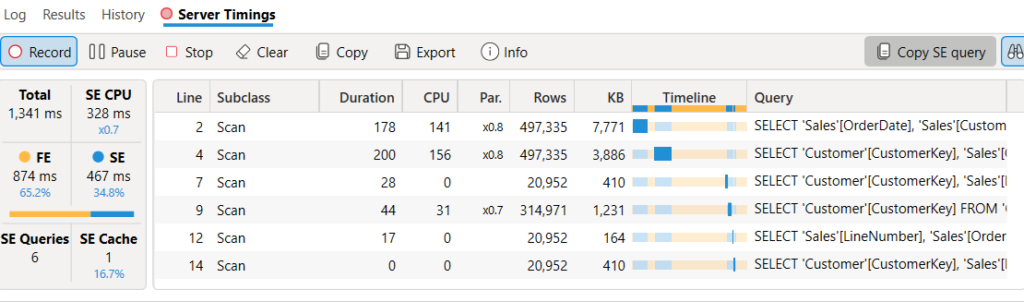
To recap the previous post, when being performed as a measure within a SUMMARIZECOLUMNS, the evaluation time was 1.3 seconds:
EVALUATE
   SUMMARIZECOLUMNS (
   Customer[CustomerKey],
   "@", [Gold Club Membership Date]
)
When moving the same measure to a calculated column, the model recalculation took a couple of seconds, which implied it was working as expected. Great!
I published this model to the service with the calculated columns and the refresh time increased by 33% – from 33 seconds (no calculated column) to 45 seconds (calculated column). Huh?
| Type | Start | Duration |
| Baseline | 8/3/2024, 11:02:13 AM | 00:33.3 |
| Calculated column | 8/3/2024, 11:05:27 AM | 00:45.4 |
The data source for each table in the model is a Gen 1 dataflow with a cloud connection inside the same tenant, and the tenant contains no other things inside it. We can very confidently say that the jump is specifically to do with the column.
I deleted the calculated column, took the exact same SUMMARIZECOLUMNS DAX, and put it to a calculated table. The table recalculated in Desktop in the expected time, but maybe that shouldn’t be trusted…
Fortunately, it did prove the problem was exclusively with the calculated column. The calculated table did not impact refresh time from the baseline, and was well within it’s normal variances:
| Type | Start | Duration |
| Calculated Table | 8/3/2024, 11:26:43 AM | 00:37.3 |
| Calculated Table | 8/3/2024, 12:27:15 PM | 00:32.8 |
In my real life example, the problem was exascerbated when the main Customer table was the subject of multiple joins – in that example, the refresh jumped from two minutes to five and a half!
So, why did the calculated column affect the refresh so significantly compared to the calculated table in the service? And why did Power BI desktop’s recalculation produce such a different result to the service? I can’t tell you the exact reason why , but the conventional wisdom out there that the order of evaluation is tables -> calculated columns isn’t entirely true…