The introduction of window functions in DAX provides a much easier and performant way to solve problems based on the tools that previously existed.
Let’s agree first up that DAX is not a programming language. Window functions are much easier and more performant in any language that can implement a do while block. However, with our analyst and DAX hat, we can use basic logic supplemented by business rules to optimize window functions as much as we can.
In this example, we want to know what customers are members of the Gold Club and what day they became a member. In this context, the gold club is customers who have made more than $30k of purchases in at least two separate day’s purchases. This measure will return the date where their cumulative sales first exceeded $30k. In other words, what was the date a particular event occured where the occurence is a result of all other events before it.
We can optimize our DAX in two ways:
- Only perform the evaluation on customers who have exceeded the purchase threshold
- Further, only perform the evaluation on customers who have made purchases over multiple days.
Only if each of these conditions are true should we perform the calculation.
By breaking out the logic in this way, there may be further optimizations you can apply based on your business rules. For example, if an approximation on the date they achieved the threshold is okay, you could use a TOPN to pre-filter the customer’s individual sales rows to their first X days of purchases. If it meets criteria one but criteria two returns blank (ie, the window attempted evaluation but didn’t return a result), we have trapped the code and can make it produce an exception. This could be the MAX date plus 7, or maybe something fancier where it figures out the average gap between that customer’s sales and adds this to the MAX observed date in the window.
I created this measure to calculate our Gold Club members:
Gold Club Membership Date =
    //must have sum of sales amount greater than purchaseThreshold
    //must have purchases over two different days
    //can only evaluate this on a per-customer basis, numbers do not aggregate.
    VAR purchaseThreshold = 30000
    VAR singleCustomer =
        HASONEVALUE ( Customer[CustomerKey] )
    VAR simpleSales =
        SUMMARIZE (
            CALCULATETABLE ( Sales, REMOVEFILTERS('Date') ), //this is to account for the fact that filtering down the sales to a subset of sales should not affect the evaluation status
            Sales[CustomerKey],
            Sales[OrderDate],
            "Sum", SUM ( Sales[Sales Amount] ) //using the cluster created by SUMMARIZE was more performant than ADDCOLUMNS. ADDCOLUMNS is definitely best practice, but more performant code trumps!
        )
    VAR meets2Days =
        COUNTROWS ( simpleSales ) >= 2
    VAR meetsPurchaseThreshold =
        SUMX ( simpleSales, [Sum] ) >= purchaseThreshold
    RETURN
    IF (
        singleCustomer && meetsPurchaseThreshold && meets2Days,
        //perform the window calc as we know it applies
        VAR windowEval =
            ADDCOLUMNS (
                SUMMARIZE (
                    CALCULATETABLE ( Sales, REMOVEFILTERS('Date') ),
                    Sales[CustomerKey],
                    Sales[OrderDate],
                    Sales[LineNumber],
                    Sales[Sales Amount]
                ),
                "Running Sum",
                    SUMX (
                        WINDOW (
                            1,
                            ABS,
                            0,
                            REL,
                            ALLSELECTED (
                                Sales[CustomerKey],
                                Sales[OrderDate],
                                Sales[LineNumber],
                                Sales[Sales Amount]
                            ),
                            ORDERBY ( Sales[OrderDate], ASC, Sales[LineNumber], ASC ),
                            PARTITIONBY ( Sales[CustomerKey] )
                        ),
                        [Sales Amount]
                    )
            )
        VAR overThreshold =
            FILTER ( windowEval, [Running Sum] >= purchaseThreshold )
        VAR firstDayOverThreshold =
            MINX ( overThreshold, [OrderDate] )

        RETURN
        firstDayOverThreshold
 //since i am evaluating all possible rows, it will always return a result if it has reached this part. however, if you performed a TOPN optimization in the step before the core table used in windowEval, this is where you could add some logic for how you want to handle approximations
    )
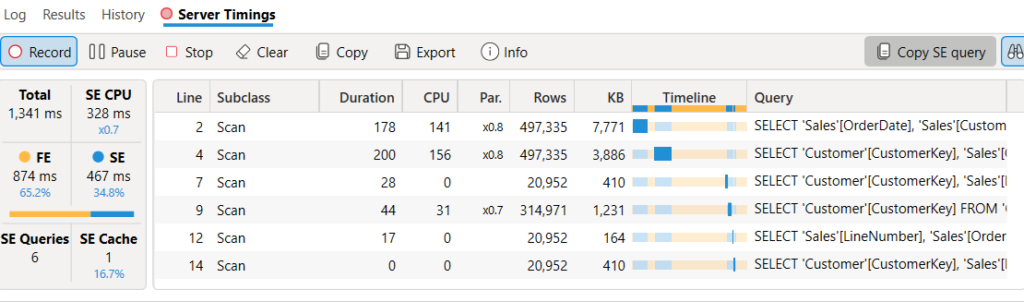
I am using Meaty Contoso™️, which is 315k customers and 1.2m sales lines. The calculation performed in a very reasonable time at 1.3 seconds. You can also see the impact of the pre-filtering steps as we reduced the relevant sales lines to 40% and relevant customers to 7%. The end result was about 1500 customers who joined the Gold Club. Congrats, folks!
EVALUATE
   SUMMARIZECOLUMNS (
   Customer[CustomerKey],
   "@", [Gold Club Membership Date]
)
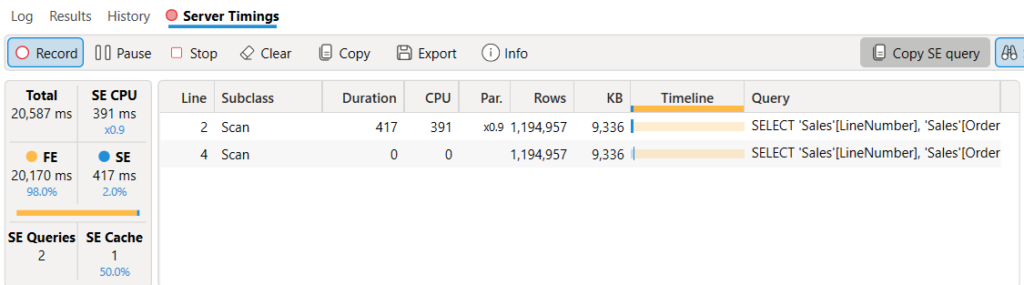
For completeness, here is the comparison when you move windowEval to a standalone calculation, replacing the the CALCULATETABLE(‘Sales’) with a reference to just ‘Sales’. Pre-filtering the table provided a tangible benefit!